Free template · Google Sheets + Excel
Free monthly budget template
for Google Sheets and Excel.
A one-page budget: plan vs actual, needs vs wants, and a 50/30/20 check that fills itself in. Try the quick split below first.
Short answer: list your take-home pay, then every expense marked as a need, a want or saving. A common starting point is the 50/30/20 split: about 50% of take-home pay on needs, 30% on wants and 20% on saving and extra debt payments. Compare it with last month's real numbers, not the ones you hope for.
The split below is a starting point. The template tracks your real numbers.
Get the template
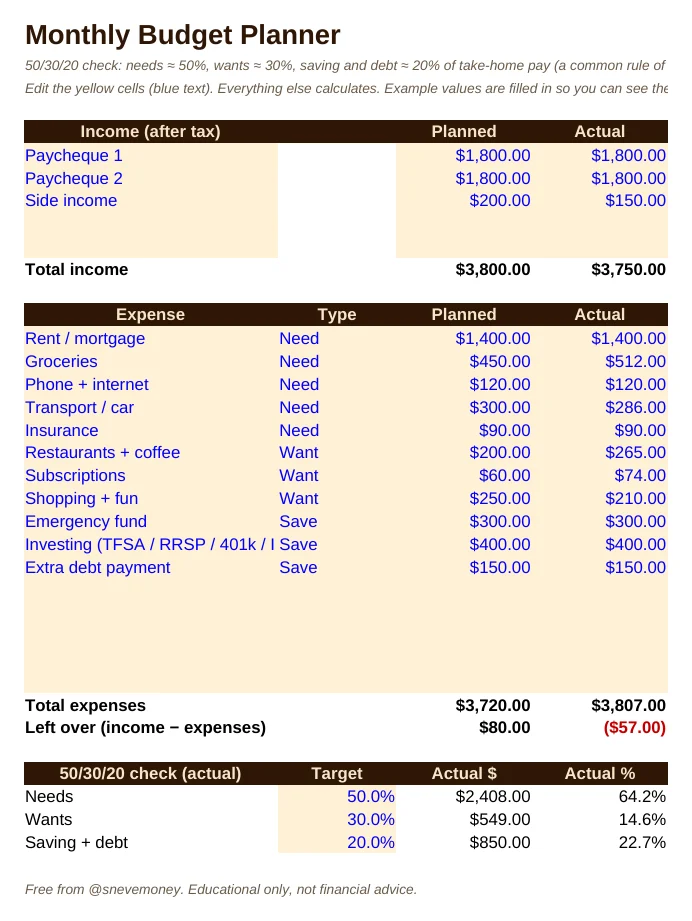
The free Monthly Budget Planner: edit the yellow cells and the totals and 50/30/20 check calculate for you.
Free. Plus one money email a week. Unsubscribe in one click.
How to build your budget in 15 minutes
- Write down your take-home pay for the month: what actually lands in your account.
- List every regular expense from last month's bank statement and mark each one as a need, a want or saving.
- Compare with 50/30/20. If needs are well over half, that's normal in many cities; look at wants first.
- Pick one change for this month. One subscription, one delivery order less a week, one automatic transfer to savings.
- Update the actual column once a week. Five minutes is enough.
What's in the free template
- Income and expense rows, planned vs actual
- Need / want / save tags with a 50/30/20 check that calculates itself
- "Left over" line that turns red when you overspend
- Works in Google Sheets, Excel and Numbers. No macros.
Questions
How do I open it in Google Sheets?
Download the file, go to Google Sheets, then File → Import → Upload and pick the file. It works in Excel and Numbers too.
Is the 50/30/20 rule right for me?
It is a rule of thumb, not a law. In expensive cities needs often take more than 50%. Use it to see where your money goes, then set your own targets.
Do I need to track every coffee?
No. Track categories. Check your bank app once a week and update the actual column.
Is it really free?
Yes. The budget template and 6 other tools are free, and stay free.
Is this financial advice?
No. It is an educational tool.
The 50/30/20 split is a common budgeting rule of thumb, used here as a starting point.
Want all of it in one file? Money Toolkit Pro links 10 tools together, CA$19. The free tools stay free.
More free tools: TFSA vs RRSP vs FHSA calculator · Debt payoff calculator · all calculators · money quiz